Luma’s guest list is very good at what it’s for: registration, approvals, ticket info, contact tags, guest activity, and blasts people actually open. But run a conference on it and you start asking questions that cross into the rest of the event. Which of these 400 guests are also speakers? Which attendee is the decision-maker for a sponsor? What did a teammate promise them, and where should that context live?
That’s the CRM gap here. Luma can organize its calendar audience; it does not connect a person to your CFP, speaker operations, sponsor pipeline, and program in one working record with your team’s notes. Here are the three real routes for adding that event-wide context, including the one that’s new.
Route 1 — the CSV export (free, static)
Luma exports your guest list as a CSV from the event’s guest management view, on any plan. For a one-off — a check-in sheet, a headcount for a sponsor — it’s fine. As a CRM strategy it means re-exporting after every registration wave, deduplicating against your last import, and accepting that notes and tags you add downstream never see a fresh export again. Snapshot, not system.
Route 2 — an API bridge you build (Luma Plus + your time)
Luma’s API and registration webhooks (both on Luma Plus) can feed a real CRM: point a webhook at your endpoint, or wire Zapier to your CRM’s create-contact action. It works, it’s live, and the common create-contact version is one-way. Luma does expose write APIs, so you can also build approvals, invitations, and ticket-type updates back into Luma — but then you own both directions, their failure handling, and reconciliation. Either way, it’s another bridge in an already-long tool chain, and you’re its maintainer.
Route 3 — the native sync (new)
AgendaForge now ships a native Luma integration. The setup is three steps, no middleware:
- Connect Luma. In your event’s Registrations → Providers tab, paste the API key for the Luma calendar that owns the event (Settings → API). Luma Plus is required — Luma gates its API to Plus — and the key is validated immediately, then stored encrypted. AgendaForge currently connects one Luma calendar per organization.
- Bind your Luma event. Pick it from the dropdown. A full guest backfill runs on the spot, and live tiles show attendees synced, accepted, pending, declined, and orders.
- Work the list. From here the sync maintains itself: new registrations, status changes, and refunds arrive via Luma’s signed webhooks, and a Re-sync button exists for whenever you want belt and suspenders.
What makes this a CRM answer rather than another mirror:
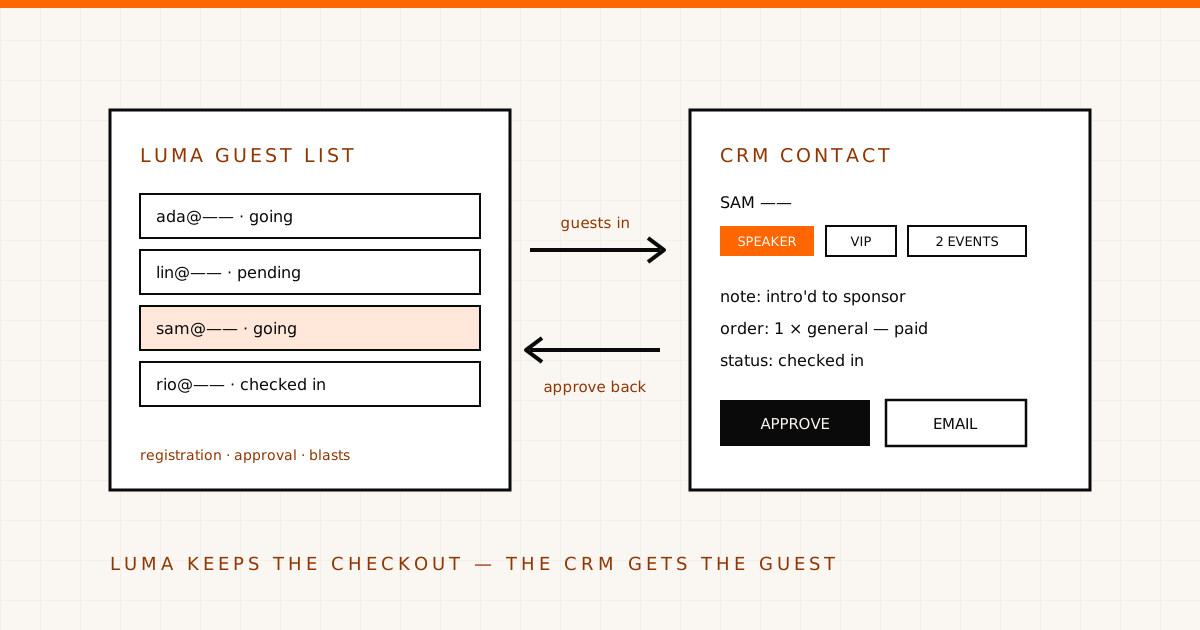
- Every guest is a contact and event member — the same directory as your speakers, sponsors, and CFP submitters, with tags, notes, activity, saved segments, and email. The “which guests are also speakers” question becomes a filter, not an afternoon.
- It writes back. Approve, decline, waitlist, or set a guest to pending from AgendaForge; invite new guests by email; push ticket-type changes (price, capacity, sale window, approval) to Luma. Luma stays the source of truth — actions land there, then mirror back.
- Orders come with their line items, so who-bought-what is queryable next to who-they-are.
- Check-ins mirror in, so post-event, attendance sits on the contact record where your next event can use it. (Scanning itself stays in Luma — its check-in API is read-only.)
- Contacts flow onward to Google Sheets if a spreadsheet is part of your workflow — which finally gives Luma events a live sheet with no Zapier.
What deliberately stays in Luma
Three things, and they’re boundaries rather than gaps. Checkout: buyers pay on Luma’s hosted page and funds settle to your own Stripe — AgendaForge never touches the money and takes no fee on Luma sales. Full refund and cancellation management: the order view deep-links you to Luma and mirrors the outcome, although declining an accepted guest in AgendaForge can optionally ask Luma to refund them as part of that change. Check-in scanning: Luma’s check-in flow does the scanning; AgendaForge holds the resulting record.
Choosing a route
If you need a snapshot, export the CSV. If you need a live feed into a CRM you already run, Luma’s webhooks are genuinely workable — budget for the maintenance. If what you actually want is your Luma guests managed next to the event itself — program, speakers, sponsors, and attendees in one system — that’s the native sync. It’s part of AgendaForge’s Pro plan ($4,000 per event, pricing published like everything else), we’re invite-only while we onboard early partners, and the full capability list — including every limitation above — is public.